How to check and correct defects
日本語ガイドはこちら
Your face photo must be registered to your MOALA Account linked to your TOBE ID.
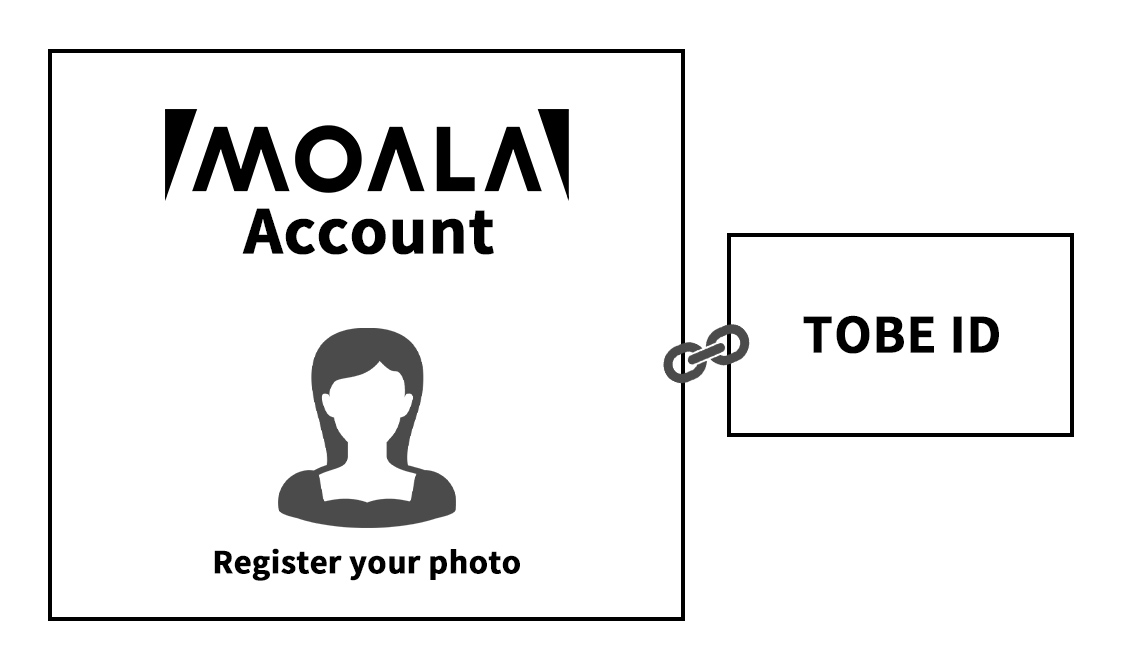
Please be sure to check your registration status yourself.
We cannot answer inquiries regarding customer registration information.
Link the main attendee's TOBE ID and MOALA Account
Access your MOALA Account tap the hamburger menu (≡) in the top right corner, select 'External Account Linking,'(外部アカウント連携)and verify your TOBE ID.
- Please check if "Linked"(連携済み) is displayed. If your TOBE ID is 'not linked'(未連携) at this stage, please be sure to link main attendee's TOBE ID.
- If it says "Linked"(連携済み) please confirm that the main attendee's TOBE ID is linked.
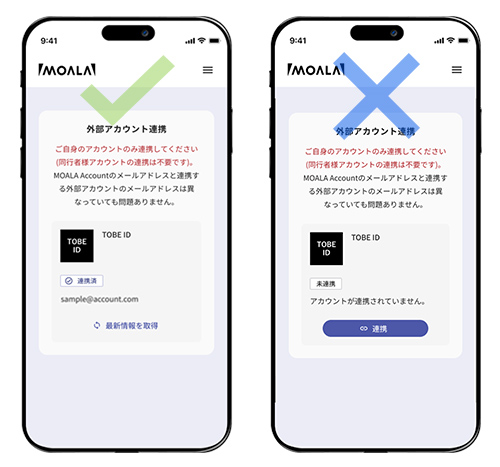
Note:
- If you receive an error stating 'Already linked to another MOALA Account'(すでに他のMOALA Accountに紐づいています)when linking your new TOBE ID, please make sure to log in with the correct MOALA Account.
check
Register the main attendee's face photo to the MOALA Account
On your MOALA Account, tap the hamburger menu (≡) in the top right corner and select 'Account information'(アカウント情報).
- Please make sure your "face photo"(顔写真) is "Registered"(登録済み).
- Please make sure that the main attendee's face photo is correctly "registered"(登録済み) in the MOALA Account confirmed in [Step 1]. If it is "not registered"(未登録), please register a face photo from the "Go to Registration Screen"(登録画面へ).
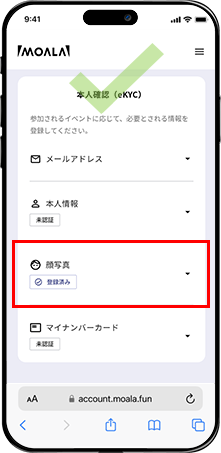
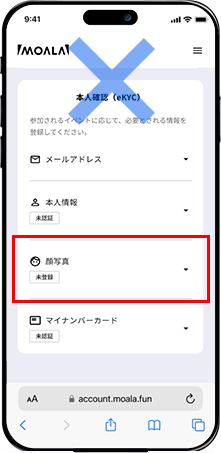
Note:
- Please be sure to register your photo after confirming that your TOBE ID and MOALA Account are linked in [Step 1].
- Even if you register a face photo to a MOALA account that is not linked to your TOBE ID, your registration will not be completed.
- Once a photo is registered, it cannot be changed for one year after registration, regardless of the reason.
- Registration for "公開プロフィール" "本人情報" "マイナンバーカード" is not required for this performance.
- Even if you register your My Number Card, you will not be able to enter using facial recognition.
check
If you are applying for one ticket, this is all for you to confirm.
If you are applying for two or more tickets, please proceed to "Step 3: Confirming your companion registration information."
Confirmation of accompanying person information registered by the main attendee.
Please go to the application list on your My Page, tap the "Check application status"(申込み状況を確認する)⇒"companion registration"(同行者登録・確認)and check the information for the companions you have registered.
Note:
- There have been many cases of people entering their TOBE ID (email address) incorrectly. Please be careful not to make any mistakes when entering your registered TOBE ID (email address) and phone number.
- The TOBE ID must match your accompanying person's exactly, including uppercase letters and lowercase.
- The representative should instruct accompanying persons to check their account correct information.
- Please be sure to enter the information with the consent of the accompanying person.
check
From Step 4 onwards, will be handling by accompanying persons.
Link the accompanying guest's TOBE ID and MOALA Account
Access your MOALA Account tap the hamburger menu (≡) in the top right corner, select 'External Account Linking,'(外部アカウント連携)and verify your TOBE ID.
- Please check if "Linked"(連携済み) is displayed.
If your TOBE ID is 'not linked'(未連携) at this stage, please be sure to link accompanying person's TOBE ID. - If it says "Linked"(連携済み) please confirm that the accompanying person's TOBE ID is linked.
Note:
- If you receive an error stating 'Already linked to another MOALA Account'(すでに他のMOALA Accountに紐づいています)when linking your new TOBE ID, please make sure to log in with the correct MOALA Account.
check
Register the accompanying guests face photo to the MOALA Account
On your MOALA Account, tap the hamburger menu (≡) in the top right corner and select 'Account information'(アカウント情報).
- Please make sure your "face photo"(顔写真) is "Registered"(登録済み).
- Please make sure that the accompanying guest's face photo is correctly "registered"(登録済み) in the MOALA Account confirmed in [Step 4]. If it is "not registered"(未登録), please register a face photo from the "Go to Registration Screen"(登録画面へ).
Note:
- Please be sure to register your photo after confirming that your TOBE ID and MOALA Account are linked in [Step 4].
- Even if you register a face photo to a MOALA account that is not linked to your TOBE ID, your registration will not be completed.
- Once a photo is registered, it cannot be changed for one year after registration, regardless of the reason.
- Registration for "公開プロフィール" "本人情報" "マイナンバーカード" is not required for this performance.
- Even if you register your My Number Card, you will not be able to enter using facial recognition.
check
This completes the verification.